
Install & download
This page covers downloading and installing tessoa on Windows, macOS, and Linux, plus system integration, updates, and uninstalling.
Download
| Platform | Download |
|---|---|
| Windows | tessoa.exe |
| macOS (Apple silicon, M series) | tessoa-macos-aarch64.dmg |
| macOS (Intel) | tessoa-macos-x86_64.dmg |
| Linux | tessoa.tar.gz |
These links always point to the newest version.
Requirements: Windows 10 / 11 · macOS 12 or newer · Linux (64-bit, glibc 2.35 or newer)
Setup by platform: Windows · macOS · Linux
Windows
Double-click tessoa.exe to open it. You do not have to install it first.
If "Windows protected your PC" appears, click More info → Run anyway. Windows often shows this for newly released versions. Anything downloaded from the links above is safe to run.
Install it on the system
Once installed, you start tessoa from the Start Menu instead of going back to your downloads folder for that file every time. The desktop shortcut, right-click entries, and Add to PATH toggles below also require it to be installed.
- Open Install / Integrate from the Start Page, or from the Maintenance group in Settings (Ctrl+Shift+P).
- Confirm where to install it (the default is fine) and click the main button at the bottom of the page.
A line at the top of the page says where you stand: Not installed (running standalone), Installed with a version number, or Installed · latest version. The main button follows that state — Install if you never have, Update & Replace if an older version is installed, and Reinstall if it is already current.
You do not need administrator rights; it installs for your account only. Afterwards tessoa shows up in the Start Menu, you launch it from there, and the tessoa.exe you downloaded can be deleted.
Running it without installing: the tessoa.exe you downloaded is the whole program. It runs from any folder and works indefinitely that way. Installing copies that file to %LOCALAPPDATA%\tessoa, records the uninstall entry, and puts a shortcut in the Start Menu. Either way it reads and writes the same data under %APPDATA%\tessoa, so installing or not — and installing where — leaves your tags, settings, and layouts alone. That data does not travel with the exe, though; see where tags are stored.
System integration
The System Integration section of the install page has four toggles, and you can come back and change them any time. Once tessoa is installed, that heading carries the suffix (applies instantly) — flipping a toggle reaches the system right away, with no second click on install.
| Toggle | What it does |
|---|---|
| Desktop shortcut | Puts an icon on the desktop |
| Right-click entries | Adds Open with tessoa when you right-click a folder |
| Add to PATH | Lets you start it by typing tessoa on the command line |
| Replace File Explorer (experimental) | See the warning below |
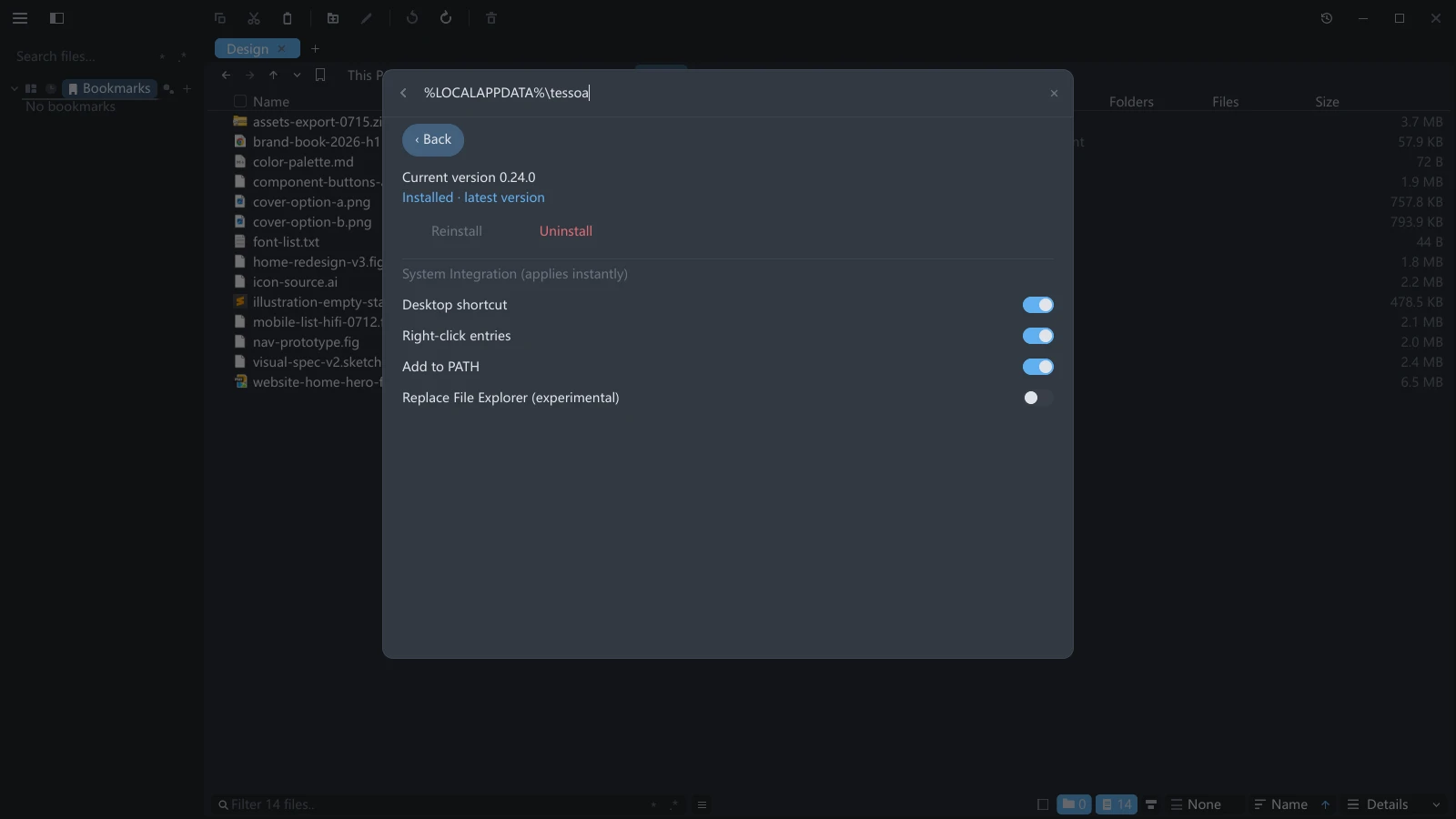
Replace File Explorer is experimental. With it on, double-clicking a folder, double-clicking a drive, and pressing Win+E all open tessoa, as do This PC and the Recycle Bin — double-clicking the desktop's Recycle Bin lands on tessoa's own Recycle Bin page. Places tessoa cannot express — Control Panel, Network, Libraries — are still handed back to File Explorer. Turn the toggle off or uninstall tessoa and everything goes back to normal. Explorer windows that are already open, and taskbar pins, are unaffected.
While Replace File Explorer (experimental) is on, a sub-toggle appears underneath it: Win+E / taskbar opens a new window. (With the takeover off the row is not shown — Win+E would not start tessoa at all then.)
| This toggle | Pressing Win+E or clicking the taskbar icon |
|---|---|
| Off (default) | Brings the window you already have to the front, opening neither a window nor an extra tab |
| On | Opens a new window every time |
Double-clicking a folder is unaffected either way: always a new tab in the current window. For a new window on demand, use Ctrl+N.
Uninstall & updates
- Uninstall: click Uninstall on the install page, or use Windows Settings → Apps → Installed apps. Your preferences are kept.
- Update: click Check for Updates in the About group in Settings. When a new version turns up, the message that appears has an Update Now button, and tessoa downloads, verifies, replaces, and restarts itself, with nothing to download by hand. You can also fetch a new
tessoa.exeand overwrite the old one.
With Auto-check for Updates (daily) on, tessoa checks in the background at most once a day.
macOS
- Download the dmg for your chip. To check which one you have, use Apple menu → About This Mac.
- Open the dmg and drag
tessoainto Applications. - Open it from Launchpad or the Applications folder.
Update: click Check for Updates in the About group in Settings. When there is a new version the message offers Update Now, and tessoa downloads, verifies, replaces, and restarts itself in the background, exactly as on Windows. There is one exception: if tessoa is not running as an .app bundle (say you opened it straight from the dmg without dragging it into Applications), the message offers Download instead, which opens the website so you can re-download the dmg and replace it.
Linux
- Extract
tessoa.tar.gz. - In the extracted folder, either:
- Run it directly:
./tessoa - Install it (recommended, no root needed):
./install.sh, which puts the binary in~/.local/bin(already on PATH on most distributions) and installs the desktop entry and icon.
- Run it directly:
- Uninstall:
./install.sh --uninstall
Besides the tessoa binary, the archive holds tessoa.desktop and an icon for desktop integration, a README.txt, and THIRD-PARTY-NOTICES.html with the third-party open-source licenses.
Without the desktop entry, Wayland shows no app icon. Ubuntu and GNOME default to Wayland, where the taskbar and Alt-Tab take their icon from an installed .desktop entry. Run ./tessoa directly and you get a blank icon there — a platform limitation, not a bug in the program. Run ./install.sh once to install the entry and icon, then log out and back in, or reboot.
Vulkan is not required. tessoa renders through Vulkan where it can, but Vulkan is an optional package on Linux and plenty of desktops do not have it installed. Since 0.17.0, when Vulkan is unusable tessoa falls back to OpenGL ES, and the window no longer closes before drawing a frame.
Older distributions will not start it at all. The Linux build is dynamically linked, and the oldest glibc it runs on is decided by the machine that built the package: usually 2.35 (Ubuntu 22.04, Debian 12, and newer all qualify), occasionally 2.39 (Ubuntu 24.04). Below that the program does not launch; run it from a terminal and you will see a loader error along the lines of GLIBC_2.39 not found. Move to a newer distribution.
Update: click Check for Updates in the About group in Settings, then Update Now on the message; tessoa downloads, verifies, replaces, and restarts in the background. You can also re-download tessoa.tar.gz and overwrite.